

Dolphin Lifts asset management
Bespoke asset management software that simplifies customer and equipment servicing
Posted by Natalie Mayes yesterday
How do you replace an outdated business system without bringing its problems with it? When Dolphin Lifts Western came to us, they needed a simpler way to manage customers, equipment and ongoing maintenance. Here’s how we tackled the challenges, streamlined their processes and built a custom asset management system in .NET around their day to day work.
Replacing legacy software with a custom .NET asset management system
A custom customer asset manager for Dolphin Lifts Western, built around how their team actually works.
Replacing business software sounds straightforward enough. Take what you’ve already got, build a newer version and move the data across.
Except the old system usually comes with years of workarounds, unused features and processes nobody particularly likes. Rebuilding all of that would be an expensive way to end up with the same problems in a shinier package.
That was the challenge when Dolphin Lifts Western came to us. Their existing software was reaching the end of its supported life. It handled customer and equipment information, but it also contained functionality they didn’t use. The alternatives they’d looked at were either too complicated, too restrictive or too costly for what they needed.
So rather than recreate the old system, we worked with their team to rethink it. The result was a custom customer asset management application built in .NET, focused on customers, equipment, call outs and ongoing servicing.
Planning a bespoke asset management system
The temptation with any legacy software replacement is to start with a list of everything the existing system does.
That’s useful as a reference, but it’s not much of a brief. Some features will be essential. Others will exist because of decisions made years ago, or because the original software was trying to serve lots of different businesses at once.
We spent time understanding how the Dolphin Lifts Western team actually worked: how they organised customers, tracked equipment, handled call outs and kept on top of servicing.
Then we looked at what needed to stay, what could be simplified and what could go altogether.
Leaving things out was just as important as adding new features. Nobody needed another complicated system to learn. They needed a practical tool for the jobs they were already doing.
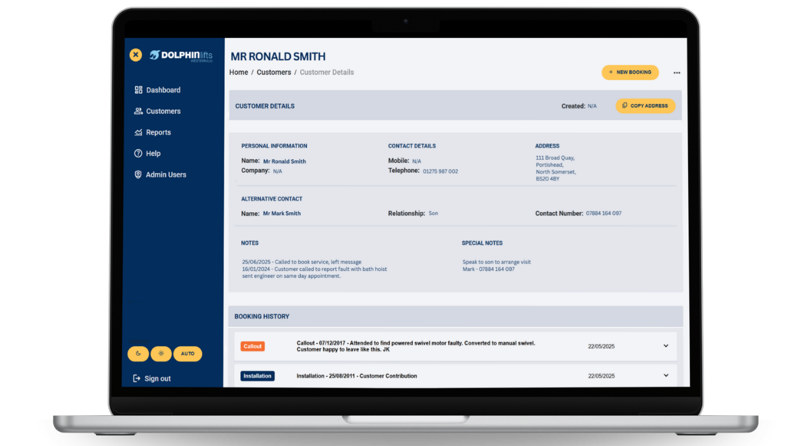
Customer → Location → Asset
That gives the team a useful overview without losing the detail. They can look at a customer, find the relevant location and get to the information for a particular lift or other piece of equipment.
More importantly, it gives servicing and support records somewhere sensible to live. A call-out isn’t just an isolated entry; it belongs to an asset, at a location, for a customer.
Organising customer, location and asset data
One of the more important technical decisions wasn’t about .NET at all. It was about how the information fitted together.
A customer might have equipment at several properties or sites. Each location might contain multiple assets. And each asset can have its own maintenance history, call outs, warranty details and servicing requirements.
Put everything against one flat customer record and it quickly becomes difficult to answer a fairly simple question: Which piece of equipment are we actually talking about?
We structured the application around a clear relationship:
Migrating legacy data into a new asset management system
The existing information wasn’t all neatly organised, either. Historical business data rarely is, particularly when it’s been collected over a long period in software that no longer fits the way a company works.
That makes replacing a system more than a case of exporting one spreadsheet and importing another.
We had to consider how the existing customer and equipment information would fit into the new structure, including the relationships between customers, locations and individual assets.
It’s not the glamorous side of custom software development, but it’s a crucial one. A well designed application is only useful if the information inside it makes sense.
Managing call outs, warranties and servicing in one system
For a servicing business, installing equipment is only the beginning of the relationship.
There are ongoing service agreements to manage, warranties to keep an eye on, call outs to record and services that need attention. When those details are scattered across different records or systems, even a routine enquiry can take more effort than it should.
We brought the relevant information together in the customer asset manager, so the team can review an asset in the context of its customer, location and ongoing maintenance.
This wasn’t about building the biggest possible field service platform. It was about making the common tasks clearer and giving the team a better view of the work that matters.
Asset management reporting for maintenance and servicing
A system can hold plenty of data and still be surprisingly bad at answering questions.
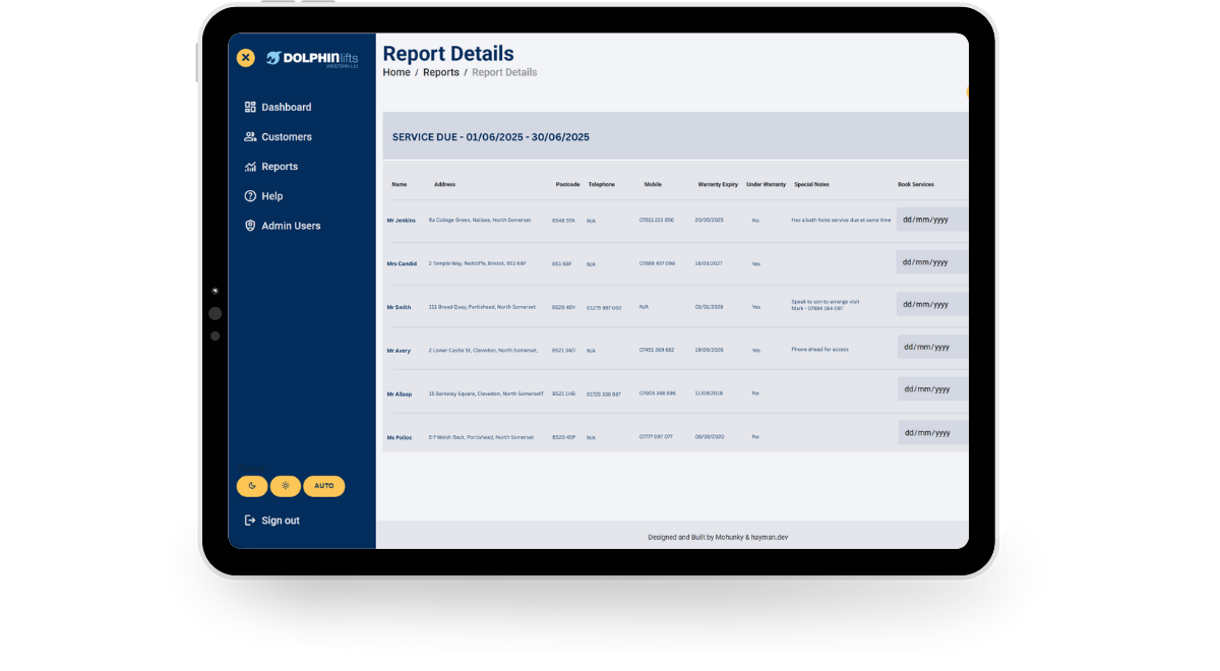
Dolphin Lifts Western needed to review information across customers and equipment, not just open records one at a time. We included reporting for call outs, warranty expirations, service agreements and overdue services.
That introduced an important design consideration: reporting only works when the underlying information is recorded consistently and connected to the right things.
So reporting wasn’t treated as a decorative dashboard to bolt on at the end. It helped inform the data structure and the information the application needed to capture in the first place.
The aim was straightforward: make it easier to see what needs attention, without having to piece the answer together manually.
Mobile asset management on laptops and tablets
Maintenance work doesn’t happen exclusively behind a desk, so the software couldn’t assume everyone would be sitting at one.
We made the application practical to use on laptops and tablets, giving the team access to customer and equipment information while they’re out and about.
That also makes it easier to update records closer to the point where the work happens, rather than relying on paperwork and another round of admin back at the office.
There’s little point simplifying a process on screen if the real world version is still awkward.
Building custom asset management software in .NET
We build a lot of our custom applications using .NET, and it was a good fit for this project.
It gave us the flexibility to create the relationships and workflows Dolphin Lifts Western needed, rather than trying to force their business into a rigid, off the shelf system.
But the choice of technology wasn’t the most important part of the project. Understanding what the team needed, simplifying the processes and organising the information properly came first.
The code is there to support those decisions. Not the other way around.
Making legacy software replacement work for your business
The lesson from this project isn’t that every business needs bespoke software. Plenty don’t.
It’s that replacing old software is an opportunity to improve how you work, not just change what you work in.
For Dolphin Lifts Western, that meant moving away from an ageing, oversized system towards a more focused customer asset manager: one that connects customers, locations, equipment and servicing without dragging every old complication along with it.
And that’s the sort of problem we enjoy solving at mohunky. Real business problems, practical software and no unnecessary bells and whistles.
Got an ageing system, awkward spreadsheets or software that doesn’t quite fit anymore?
Get in touch with mohunky and tell us what you’re working with. We’ll help you work out whether custom software is the right answer - and we’ll say so if it isn’t.
Read more posts...
Cornerstone v8: The engineering rationale behind mohunky’s unified UI Platform
Posted by Rob Mayes earlier this year
How Cornerstone is quietly transforming everything we build at mohunky
Posted by Natalie Mayes earlier this year
Chat to us on WhatsApp
Scan, click or tap the QR code to start a WhatsApp chat.

Let's chat
If you have a specific project in mind, or you’re not sure what you need, please get in touch - we’d be happy to chat, even if it’s just for friendly advice!