

Calculating your website carbon footprint
Have you ever thought about it? And is it important?
Posted by Natalie Mayes some time ago
If you are curious about your website’s carbon footprint, the good news is that it is very easy to get a clear idea of how much CO₂ your pages produce. Every website uses energy, and every page load has an environmental cost, even if your site feels fast or lightweight. The size of your pages, how they are built, and where they are hosted all play a part.
A great place to begin is Website Carbon, a free tool that gives you an instant estimate of your site’s emissions. You simply enter a URL and the tool shows you how much CO₂ is released each time that page loads, along with a comparison against other sites. It is quick, it is visual, and it gives you a helpful baseline for improvement.
Once you know your starting point, you can explore small changes that reduce your impact, such as streamlining images, tightening code, or choosing greener hosting. Checking your site’s footprint is an easy first step toward making your digital presence a little cleaner and kinder to the planet. (Scroll down for your FREE carbon efficiency checklist!)
As part of our standard practice, we are also introducing a carbon calculator widget to the footers of all the websites we build. This brings the environmental impact of each page into view and encourages awareness and accountability for both the site owner and the user. For anyone with a strong environmental drive, it becomes something positive to work toward, a small but meaningful way to track progress and make more sustainable choices.
How WebsiteCarbon.com measures your site’s footprint

Step 1
When you enter a URL into Website Carbon, the tool loads the page just as a browser would and measures the amount of data, in kilobytes, that is transferred in order to display it. This gives an initial indication of how heavy the page is in practical, real world terms.

Step 2
That data transfer is then converted into an estimate of the energy required to load the page. This calculation takes into account the energy used by the server in the data centre, the network that delivers the information, and the device being used by the visitor.

Step 3
Using global average data, or regional energy grid information where possible, the tool then translates the estimated energy use into grams of CO₂ equivalent per page view. It also factors in whether the hosting environment is powered by renewable energy, which can significantly affect the final number.

Step 4
Once the calculations are complete, you receive a clear output that includes a CO₂ value per page load and a simple grade from A+ to F. You can multiply the per load figure by your typical traffic to understand your monthly or annual emissions, and the grading system helps you compare how clean your website is relative to others.
Why your Agency and Clients should care about it
If you build and maintain websites for small to medium enterprises, you are in a particularly good position to influence digital sustainability.
And it matters because:
-
The digital world is no longer a tiny slice of global emissions. Depending on how you measure it, the numbers vary, but it is clear that the web plays a noticeable role in our overall carbon footprint. That means it is an area where climate conscious businesses can genuinely make improvements.
-
A cleaner website is usually a faster website. When you reduce data transfer, optimise images, and cut down on unnecessary scripts, pages load more quickly and visitors enjoy a smoother experience. It is a win for both performance and the planet.
-
For clients, having an environmentally friendly website is a real added value. It supports more sustainable operations, strengthens their brand image, and can even be a talking point for customers who care about environmental impact.
-
As the web grows more complex, with heavier media and more tracking by default, website footprints can increase without anyone noticing. A little care and intention go a long way in keeping sites efficient, lightweight, and kinder to the environment.
mohunkys website footer Carbon widgets
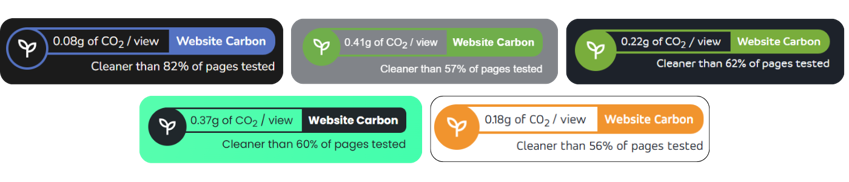
By using the data from Website Carbon calculator, mohunky is starting to shine a light on just how efficient our Umbraco websites are. Because of Umbraco’s clean setup and lightweight output, the sites we build tend to load quickly and use less energy with every page view. That means smoother experiences for visitors and a naturally smaller carbon footprint without you having to do anything extra.
We have created a widget, powered by this same data, that sits neatly in the footer of our websites. It gives a clear, 'at a glance' view of the environmental impact of each page, making it easier for both site owners and visitors to understand how their browsing translates into real world CO₂ use. It is a simple, transparent way to spark awareness and encourage small, meaningful improvements over time.
How you can clean up your own website
If you want to help your websites run cleaner and lighter, try some of these simple, concrete steps you or your clients can take:
1. Start by checking your pages with Website Carbon
➔ Begin with the homepage, key landing pages, and any templates that get a lot of traffic.
➔ Note the CO₂ per page view and combine it with your analytics data to get a sense of the site’s monthly or yearly emissions. It is a great way to understand your baseline.
2. Take a close look at heavy assets and code
➔ Large images, videos that autoplay, chunky JavaScript frameworks, and lots of third party tracking all increase data transfer.
➔ Optimise wherever you can - compress images, serve them at the right size, use modern formats like WebP, lazy load media, and minimise or defer scripts that are not essential.
3. Use simple, efficient design practices
➔ System fonts or small font sets, SVG icons instead of image files, and lightweight frameworks all help keep page weight down. As Website Carbon often shows, even very clean, simple sites can achieve CO₂ numbers in the hundredths of a gram per page view.
➔ Keep your markup semantic and tidy, and remove anything that is no longer needed.
4. Choose greener hosting where possible
➔ Hosting providers that use renewable energy or run highly efficient data centres can reduce the emissions associated with every page load.
➔ When you make hosting recommendations for clients, try to include environmental impact alongside cost and reliability.
5. Keep an eye on things over time
➔ Each time you add features or make updates, run a fresh carbon and performance check. Catching any creep early helps keep the site efficient.
➔ Share emissions estimates with clients, especially those who care about sustainability. It is a powerful value add: “Here is your CO₂ per 10,000 page views, and here is how much we can reduce it with optimisation.”
Download your FREE Carbon Efficiency Checklist:

Read more posts...
Eco friendly websites - for a more sustainable digital world
Posted by Natalie Mayes some time ago
Why a Small Business Should Use Umbraco
Posted by Natalie Mayes some time ago
Chat to us on WhatsApp
Scan, click or tap the QR code to start a WhatsApp chat.

Let's chat
If you have a specific project in mind, or you’re not sure what you need, please get in touch - we’d be happy to chat, even if it’s just for friendly advice!