

Do I need a new website, or can I fix the one I've got?
Posted by Natalie Mayes today
You’ve been told you need a new website. Again.
Perhaps the current one is slow, difficult to update or causing problems on phones. You know something needs attention, but you’re less convinced that it means paying for a full redesign or rebuild.
You might still like the way it looks. Your customers recognise it. You’ve already spent time getting the photographs, colours and wording right.
It’s reasonable to ask whether all of that really needs replacing.
Sometimes a new website is the right answer. Often, you can fix specific problems or rebuild the foundations while keeping the design. The important thing is understanding what is wrong before deciding how much needs to change.
Can I fix my existing website instead of replacing it?
A website can look perfectly suitable and still have technical problems. Equally, it can load quickly but leave visitors confused about what you do.
Those are different problems, and they need different solutions.
There are usually three options:
| Option | When it makes sense | What changes |
| Repair the existing website | The underlying system is sound and the problems are specific | Targeted fixes to speed, forms, content or individual pages |
| Rebuild while keeping the design | The appearance still works, but the technology underneath is difficult to maintain | Code, templates and possibly the content management system |
| Redesign and rebuild | Both the technology and the visitor experience need substantial work | The structure, appearance and underlying build |
A slow homepage, for example, might need smaller image files and fewer unnecessary scripts. That alone is not a reason to redesign every page.
Before accepting a recommendation, ask what has been tested, what is causing the problem and why a smaller fix would not be enough.
Is my website too old?
Look at its condition, not just its age. There isn’t a birthday after which a website automatically needs replacing.
A well maintained older site may still serve its customers well. A newer one may already be awkward to use or expensive to change.
More useful questions are:
- Does the software still receive security updates?
- Can customers use the website comfortably on their phones?
- Do enquiries, bookings and payments work reliably?
- Can you update important information without a struggle?
- Does the website still reflect what your business offers?
Age matters when it brings unsupported software, unreliable features or mounting maintenance work. It matters much less when the site remains supported, useful and manageable.
If someone says your website is “too old”, ask them to explain what that means in practical terms.
What is the average lifespan of a website?
You’ll often hear that a website lasts three to five years. That is a rough guideline for considering a substantial refresh, rather than an expiry date.
A well built website can remain useful for longer with regular maintenance and improvements. Its content, design and underlying software may need attention at different times, so updating one does not automatically mean replacing everything.
How your CMS and plugins affect your website’s lifespan
Your content management system - the software you use to edit your website - also influences how easily it can be maintained over time.
Some website setups depend on numerous separate plugins, themes and third party apps. Each has its own developer and update schedule. If an essential component stops receiving support, it may eventually become incompatible with newer software, develop security problems or stop working properly.
A carefully maintained setup with fewer unnecessary dependencies can be easier to keep working over the long term. Every CMS still needs ongoing care, and custom built features need support too.
An unsupported component does not necessarily mean replacing your whole website. Sometimes that component can be replaced. In other cases, rebuilding the foundations while keeping a successful design is the more practical option.
If your website still reflects your business, works well for customers and runs on supported software, its age alone is not a reason to start again.
Can I keep my website design but improve it?
Yes, provided the design still helps your visitors.
Your branding, photographs, page layouts and useful content can often remain while the implementation underneath is replaced.
Think of a customer opening your homepage. They see the same familiar business, but the page loads more smoothly, the menu responds properly and the enquiry form is easier to use. Behind the scenes, you can update a service or change an image without worrying about breaking the layout.
That is the purpose of a website rebuild without redesign.
Keeping the design does not have to mean preserving every detail. Small changes to text size, colour contrast, button spacing or mobile navigation may still be worthwhile. The aim is to retain what works while addressing the things that get in people’s way.
How a website rebuild without redesign works
The starting point is an assessment of the existing site: what customers use, what brings in enquiries, what you struggle to manage and what the technical checks reveal.
From there, the work might include:
Rebuilding the page templates. These control how content appears. Recreating them with clearer HTML and more efficient styling can preserve the layout while making the site easier to maintain.
Improving image delivery. A phone should not need to download a huge photograph intended for a large screen. Appropriately sized images and suitable compression can reduce the amount visitors have to download.
Reducing unnecessary code. Scripts for unused features can still load on every page. Removing unnecessary work can help pages load and respond more efficiently.
Reviewing hosting and caching. Caching lets the website reuse prepared content instead of generating everything again for each visit. Hosting and server configuration also deserve attention when investigating slow responses.
Making content easier to edit. The editing system can be organised around the things you actually need to change, such as services, opening hours, testimonials and team details.
None of these improvements automatically requires a new visual identity or a change of platform. The assessment should determine what is needed.
Will rebuilding my website affect my SEO?
A rebuild needs to account for the pages and content people already find through search.
Useful page addresses should be preserved where possible. If an address must change, a permanent redirect should take visitors and search engines to the relevant replacement page. Google recommends mapping old URLs to their new destinations when planning these changes. Google’s website migration guidance
Page titles, important content and internal links also need checking. Before launch, forms, bookings, analytics and mobile navigation should be tested.
Keeping the same design does not remove the need for this work. A familiar looking website can still have substantial changes underneath.
When should I replace my website?
A more substantial replacement becomes sensible when repairing the existing site would leave you with the same underlying limitations, or the cost to fix outweights the cost of a rebuild.
That might mean software that can no longer be maintained safely, essential features that cannot be added sensibly, or recurring faults that require increasingly complicated workarounds.
A full redesign is more likely to be justified when the visible experience also needs changing. Perhaps visitors cannot understand your services, the navigation reflects a business you no longer run, or completing a booking is unnecessarily difficult.
Even then, useful content and recognisable branding may still be worth keeping.
The recommendation should explain what a replacement will solve and why repairing or rebuilding the existing design would be less suitable.
Is it worth rebuilding my website?
It can be, particularly when you’re happy with the design but spend too much time managing the system behind it or regularly feel frustrated doing what should be easy and simple tasks.
Keeping a suitable design can reduce the work involved in developing and approving a new look. However, rebuilding templates, moving content and testing features still takes time. A rebuild without redesign is not automatically a small job.
Compare the proposed cost with the cost of continuing as you are: repeated repairs, difficult updates, unreliable features and limitations on what your business needs to do next.
Ask for a recommendation that explains what can stay, what needs fixing and what needs replacing. It should also cover ongoing maintenance, so you understand what happens after launch.
Website rescue in practice: MTB Strength Factory before and after
MTB Strength Factory shows why a website redesign and rebuild can sometimes be the right solution.
Owner Ben’s biggest problem was speed. His website was so slow, particularly for visitors in America, that people arriving through paid advertising were leaving before the page loaded. He had resorted to using a third party landing page for campaigns because his own website was losing him potential customers.
Updating the site was another frustration. Ben was comfortable with IT, but regularly needed to check with his developer that a change would not break something. Everyday updates took more reassurance and support than they should have.
We rebuilt the website, moving it from WordPress to Umbraco and making speed and straightforward content editing central to the project.
Alongside Ben’s rebrand from The Strength Factory to MTB Strength Factory, we refreshed the design while retaining the visual identity he liked. Clearer navigation, bolder calls to action and a stronger focus on the training programme pages made it easier for visitors to explore what was available.
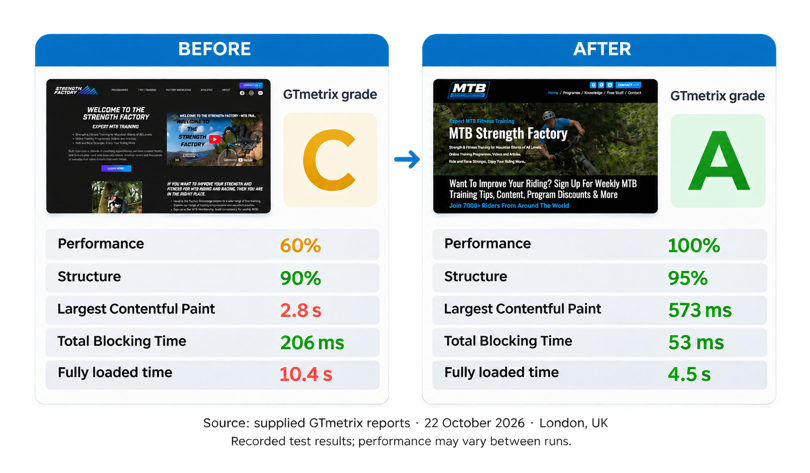
The before and after London GTmetrix tests showed the performance score rising from 60% to 100%, with fully loaded time falling from 10.4 seconds to 4.5 seconds - a 57% reduction. Ben has also reported more sales since launch.
| Measure | Before | After |
|---|---|---|
| GTmetrix grade | C | A |
| Performance score | 60% | 100% |
| Largest Contentful Paint | 2.8 seconds | 0.573 seconds |
| Fully loaded time | 10.4 seconds | 4.5 seconds |
The difference behind the scenes was just as valuable. Within 30 minutes of onboarding, Ben was confidently updating content independently, without needing guidance.
For Ben, the website rescue delivered faster performance, a clearer design and the freedom to make everyday changes without checking with his developer each time. Read the full MTB Strength Factory case study here.
Find out whether your website needs fixing or rebuilding
You do not need to decide on a full redesign before asking for help.
Send us your website address and tell us what is frustrating you, along with anything you would like to keep. We can help you understand whether targeted repairs, a rebuild using your existing design or a more substantial replacement makes sense.
Read more posts...
Website care plans: do you really need one?
Posted by Natalie Mayes earlier this month
How much does a website cost in the UK?
Posted by Natalie Mayes last month
Chat to us on WhatsApp
Scan, click or tap the QR code to start a WhatsApp chat.

Let's chat
If you have a specific project in mind, or you’re not sure what you need, please get in touch - we’d be happy to chat, even if it’s just for friendly advice! We’re based in Clevedon, near Bristol and work with businesses across the UK.